Send a card or item to a friend
Fire off a single item — trade a card, brag about a pull, ask "do you have this one?"
For one-off sharing (not a whole collection), Klepto builds a card for the item and hands it to the system share sheet. Great for trades, group chats, or texting your kid to see what they want.
Steps
- Open the item.
- Tap the share button at the top.
- Check the card. Photo, name, collection, the key catalog details, and your notes. Two QR codes at the bottom: one to eBay, and one to the maker’s own store where Klepto knows it — LEGO, Funko, Squishmallows, Discogs, and a few more — or to Amazon otherwise.
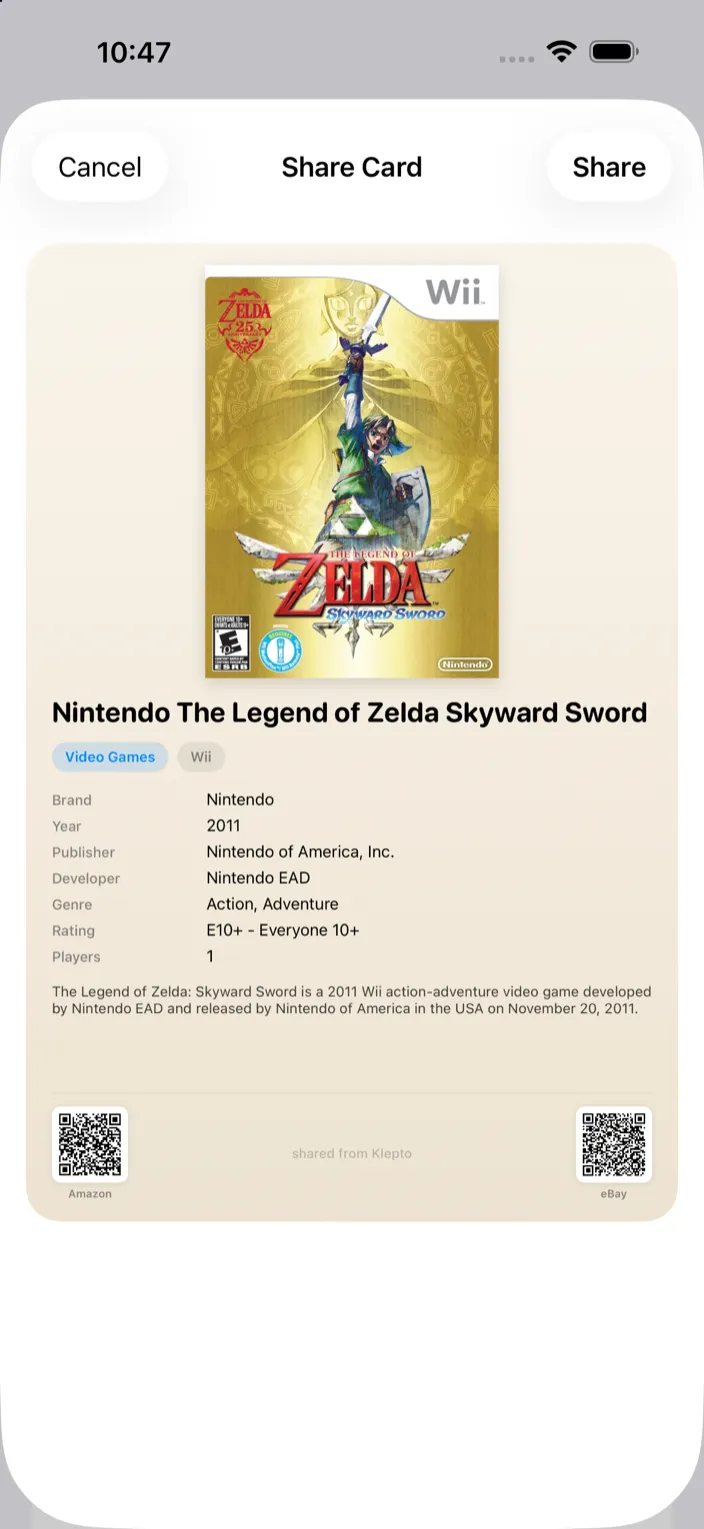
- Tap Share and pick a target — Messages, Mail, AirDrop, whatever’s installed.
Tips
- Only that item goes out — nothing else about your collection, and never your locations.
- The card is an image, so it looks the same on any phone.
- Notes go on the card. Keep private notes out of items you plan to send.